5 Lessons Learned From Build School Cohort 1
Just over a month ago five non-engineers sat in a room talking about ideas for their apps. Last Thursday they demoed working applications to a room of people. Here's what we learned along the way.

Lesson 1: Environment Setup Is Key
The Reality:
This is the first domino that needs to fall for things to work. Get this wrong and it blocks everything else and leads to frustration.
Getting SSH keys working, WSL on Windows, GitHub authentication - these “simple” setup steps consumed more time than expected.
Doing this at an in-person kickoff event was very helpful as we were able to bust through most hurdles and everyone left with ability to begin working.
What We Learned:
Setup is boring but critical - if your foundation is broken, it blocks everything else.
Windows users need WSL (Windows Subsystem for Linux) set up first and this has its own challenges as Toby found.
Don’t skimp on the setup checklist, even if it’s drudgery
The Fix:
Made environment setup a mandatory first session
I distilled all the learnings from setup challenges into this lesson which is now the 2nd step in the video course. Toby made this comprehensive setup guide for WSL and Frame0 for a Windows user.
Takeaway: The unglamorous work of getting your tools configured properly is the bedrock of everything that follows so it’s worth taking this part slowly to get it right. Once you can get Claude Code working you’re pretty much in the clear as it helps with tedious technical steps like this but you have to get over that first technical hurdle. Fortunately these steps and caveats are all now well-documented in that lesson linked above.
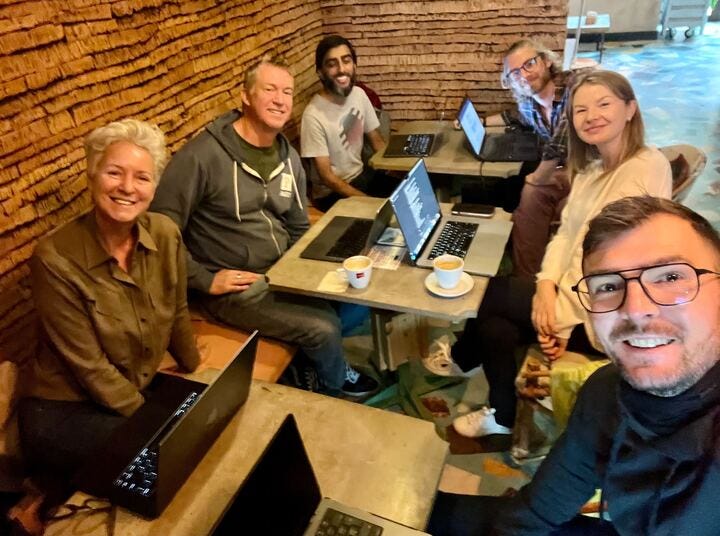
Our small but mighty crew working during one of the Friday cowork sessions
Lesson 2: Start Visual, Not Technical
The Surprise:
Students who started with Frame0 mockups (a free web-based Balsamiq-like tool) made faster progress than those who dove straight into code
Imran did comprehensive Frame0 mockups for all screens and spent extra time on this step but this design-first approach gave him clarity on exactly what to build for his admin interface.
What We Learned:
Non-technical founders think best in terms of UX, not in code
Having visual mockups makes it easier to communicate with Claude Code: “Make this screen look like this mock”
The “wireframes → prototype → Frame0 → build” flow became our standard process
Students proposed alternative tools (UXPilot.ai) showing the visual-first approach resonated however I will continue to teach Frame0 as it has this free open source MCP server which makes it possible for Claude Code to act as your UX designer
The Methodology:
Review wireframes.md from Confabulator
Use Claude to generate prototypes from PRD
Generate screens with Frame0 MCP
Tweak in Frame0, save to
/confabulator/mocksGive Claude Code the mocks: “Build these screens”
Takeaway: When you can see it, you can build it. Get a “meeting of the minds” with Claude on the screens of your app before you start building anything. This reduces false starts, code debt and headaches from having to backtrack and make changes once you’ve begun building.
Lesson 3: The Pivot is a Feature, Not a Bug
The Story:
Louise started with Coachnova (coaching platform), pivoted to dog walking app mid-course but came back to Coachnova once she & Nick partnered up
Nick’s original idea got invalidated, switched to language learning tool and shipped the fastest.
Rita iterated on her value prop and “flintstoned” the case study categorization manually via Claude Desktop on her first few before automating things.
What We Learned:
The Confabulator → Frame0 → rapid iteration workflow makes pivoting cheap
Traditional development makes changing direction expensive (sunk cost fallacy kicks in)
To the extent you can reduce switching costs and make pivoting more frictionless the cost of experimenting goes to nearly zero and you can iterate faster.
With AI tools, you can rebuild your entire app in hours, not months compressing the iteration loop to the point where you can be on a zoom call with a prospect making tweaks and pushing to production during the course of a call.
The students who embraced changing direction based on input from prospects ended up with stronger products.
Why This Matters:
Your first idea is probably wrong - and that’s fine. It’s a matter of breaking analysis paralysis and just moving forward with something that then gives you the excuse to talk with prospects and incorporate learnings from those conversations to dialing in the product.
The goal isn’t to build your original idea perfectly; it’s to build something that earns you the right to have substantive conversations with prospects so you can learn and iterate.
The cohort format gave everyone permission to change direction without feeling like failure.
Takeaway: The ability to pivot quickly is a superpower. Don’t fall in love with your initial idea or you’ll defend it in the face of contrary evidence. Instead fall in love with the problem and the discovery / pivot process to unearth and attack it.
Lesson 4: Accountability > Instruction
The Pattern:
Nick showed up to every session, asked questions, kept building and had a completed MVP 2wks in (and that was after spending the first week on an idea that didn’t work)
“Ninety percent of success in life is just showing up.” - Woody Allen. Students who missed sessions or “hadn’t done anything since last week” fell behind. Accountability and showing up to calls yields a virtuous cycle.
The group dynamic created positive peer pressure: “Everyone else is shipping, I should too.”
What We Learned:
The live troubleshooting sessions mattered more than the recorded lectures
Having Kelly share his PadelMaps.org success story on Day 1 set the tone: “This is possible” - equivalent of breaking the four-minute mile and inspiring the cohort that it can be done.
The format worked: Mon/Wed office hours + Friday in-person co-working
Students proposed tools (Gummy Search, 2chat.io) to each other. As a group we cast a wide net of awareness in a space that’s evolving quickly so it’s yet another perk: being able to unearth useful tools by having broad awareness via others.
The Office Hours Magic:
Real-time debugging (Toby’s quota limit issues, Rita’s API integration)
Watching others solve problems taught as much as solving your own
Social proof: “If they can do it, I can do it”
What Didn’t Work:
Expecting significant progress between check-ins. Everyone in the group had a full-time job and/or family commitments and it’s just not realistic to think that it’s possible to commit multiple hours per day to working on their project.
Takeaway: What’s missing for most people is not the knowledge/instruction. It’s the accountability, peer motivation, and someone to unstick you when you’re blocked. Our cadence of M/W office hours and Friday in-person cowork was the perfect mix for this.
Lesson 5: Ship Ugly, Ship Early, Ship Often
The Success Story:
Nick essentially had his iOS app done by Week 2 (Nov 14)
He shipped incomplete features, tested them, iterated
Meanwhile, some students were still “refining their foundational docs”
What We Learned:
Perfectionism kills momentum. I said this repeatedly throughout the course but “Don’t let perfection be the enemy of shipping.”
The students who deployed to Vercel early (even with bugs) made faster progress
“Comfortable with the unknown” became a mantra - trust Claude Code even when you don’t understand every line.
The database lesson: Build with dummy data first, add real database later.
The Workflow That Emerged:
Confabulator → foundational docs
Mockups → basic screens with hardcoded data
Deploy to Vercel (even if it’s borked)
Add database
Iterate based on user feedback
The Mindset Shift:
From: “I need to understand everything before I build”
To: “I’ll build, test, and figure out what I need to know as I go”
The “Checkpoint” Technique:
Commit early, commit often
Each commit is a save point - you can always
/rewindor absolute worst case nuke your installation and pull the last known-good version from Github.This gave students confidence to experiment without fear of breaking everything.
Takeaway: The flawed app you ship today beats the perfect app you’ll launch “someday.” Get it live, get feedback, get better. I am planning to add a “firedrill” step early on in the next cohort where we intentionally break things, throw away the code and pull down a pristine copy from github so students internalize how proper Github habits make you bulletproof. That confidence to develop with abandon will be priceless and liberating.
Conclusion: What I’m Changing for Cohort 2
What’s Staying:
Design-first approach (Frame0 mockups before coding)
Monday/Wednesday/Friday rhythm
Inspirational guest speaker on Day 1 (Kelly’s testimonial was gold - likely invite students from Cohort 1 back as alumni to inspire Cohort 2)
Keep small cohort size (5-6 students max)
What’s Changing:
Better Windows setup documentation (WSL guide upfront)
Frame0 and Frame0 MCP in initial setup (not added later)
Material now taught via the self-paced video course and office hours used for answering questions vs. teaching concepts
More explicit “checkpoint” rituals (commit after every session)
Standardized database approach from Day 1 (SQLite → Turso path)
The Big Lesson: Five students, five working apps, 30 days. These tools allow you to be a product manager and leverage AI as your engineering team - this is the future of building software even if you already know how to code. You can find all student demos from graduation night here. If you want to be part of Cohort 2 starting Jan 12th applications are now open. Or if you’re a self-starter and don’t need the cohort-based accountability component feel free to take the course and work independently at your own pace. Whatever your style we have an option to support you. The only question is “what will you build?”